
SMS Consent and Communication Policy
This page explains how internal users of ERP Municipal provide consent to receive SMS messages related to their account activity, system notifications, reminders, alerts, and verification codes.
1. How Users Opt In
ERP Municipal is used by authorized internal users and employees. Users may opt in to receive SMS notifications by logging into their ERP Municipal account, navigating to their profile settings, entering their mobile phone number, and explicitly granting consent to receive SMS notifications.
The SMS consent checkbox is not pre-selected. Users do not receive SMS messages unless they actively choose to opt in and save their phone number and consent preference.
2. Consent Checkbox Language
When enabling SMS notifications from their profile settings, users are presented with a consent checkbox similar to the following:
Spanish checkbox text:
Acepto recibir mensajes SMS de ERP Municipal relacionados con mi cuenta, incluyendo alertas, recordatorios, actualizaciones del sistema y códigos de verificación. La frecuencia de los mensajes puede variar. Pueden aplicarse cargos por mensajes y datos. Responda STOP para cancelar y HELP para obtener ayuda.
English meaning:
I agree to receive SMS messages from ERP Municipal related to my account, including alerts, reminders, system updates, and one-time passcodes. Message frequency varies. Message and data rates may apply. Reply STOP to opt out and HELP for help.
Users are also informed that message frequency may vary, message and data rates may apply, and that they can reply STOP to opt out or HELP for assistance.
3. Types of SMS Messages Sent
Internal users who opt in may receive SMS messages related to:
- One-time verification codes
- Internal alerts
- Task or workflow reminders
- Account-related notifications
- System status or operational updates
These SMS messages are strictly transactional and operational in nature. These messages are strictly transactional and operational. No marketing or promotional messages will ever be sent.
4. Message Frequency
Message frequency varies based on the user's activity, assigned tasks, platform events, and account security requirements.
5. Message and Data Rates
Message and data rates may apply depending on the user's mobile carrier and service plan.
6. Opt-Out and Help
Users may opt out of SMS notifications at any time by replying STOP to any SMS message received.
Users may reply HELP for assistance or contact support at https://erpmunicipal.pro/contacto.
7. Links Included in Messages
Some SMS messages may include links directing users to official ERP Municipal pages so they can securely review account activity, internal notifications, or system-related updates.
All links included in SMS messages point only to official domains associated with ERP Municipal.
8. Related Policies
Privacy Policy: https://erpmunicipal.pro/privacy-policy.php
Terms and Conditions: https://erpmunicipal.pro/terms.php
9. Consent Flow Documentation
This public page is provided to document the SMS consent flow used by ERP Municipal for internal users. Consent is collected directly from the user within their authenticated profile settings before SMS notifications are enabled.
Below is a screenshot of the profile settings form where users enter their mobile phone number and explicitly provide SMS consent by selecting the checkbox before saving.
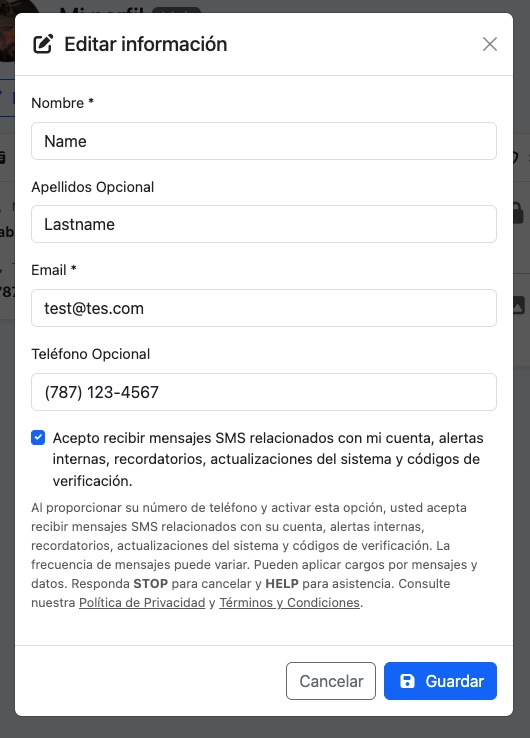
The checkbox is not pre-selected and must be actively selected by the user in order to enable SMS notifications.